“Mobile Cart with Outlet” has been added to your cart. View cart
Customizable Package of Coxo DL-300P Intraoral Scanner, Laptop, Cart
Model: DL-300P, Laptop, Cart
Manufacturer: Coxo, Acer, Astra
Warranty: 12 months
Condition: New
From34.67000leiOriginal price was: 34.67000 lei.13.99900leiCurrent price is: 13.99900 lei.
Posibilitatea achiziționării în rate prin:
Livrare in 24 de ore
Pentru comenzile depuse inainte de ora 15:00
Livrare gratuită
Pentru comenzile de peste 200 RON
Asistență tehnică
La orice comandă
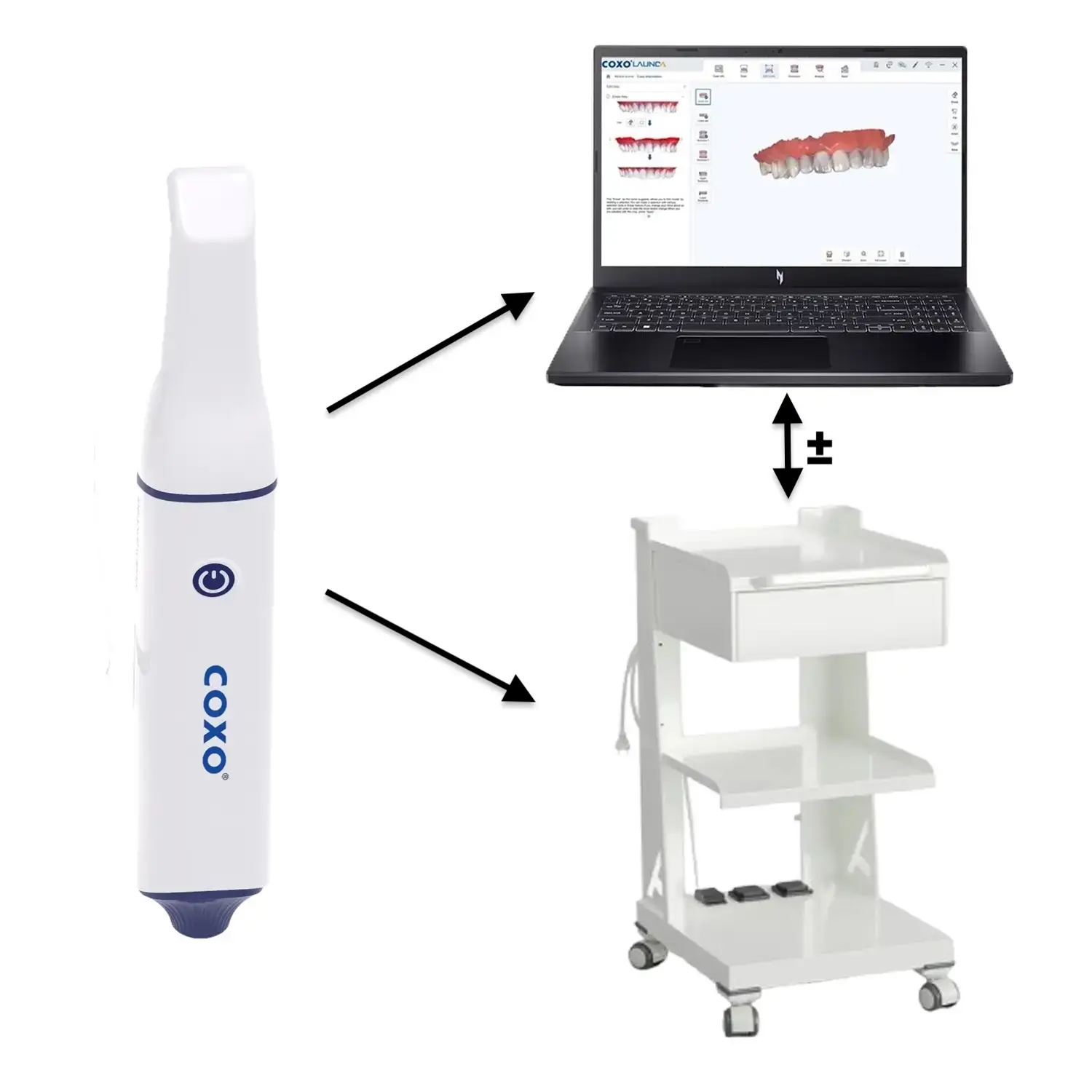
Customizable Package of COXO DL-300P Intraoral Scanner
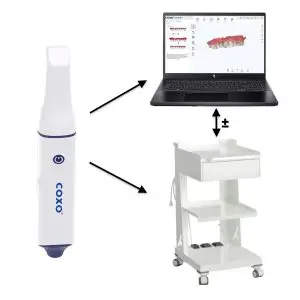
Packages Can be Customized as Follows
Scanner + Mobile Cart
Scanner + Laptop
Scanner + Laptop + Mobile Cart
We offer a 30-day scanner return policy. We understand that the affordable price may raise questions, but we want to prove that its performance has nothing to do with the idea of “cheap and poor quality.” You have 30 days to try it, use it, and if it doesn’t convince you, return it without risk.
To download the latest software version 20250612_2584 for the intraoral scanner, click HERE. We recommend checking the installed version periodically and updating it according to the procedure in the video below.
To Install the Latest Driver Version for the Video Card, Download the Nvidia Application HERE
We Have Prepared a Folder with Digital Impressions Made with the DL-300P COXO Intraoral Scanner. These are Available for Download and Analysis in STL, PLY, and OBJ Formats, Giving You the Opportunity to Test and Better Understand the Quality and Precision of this Scanner. Access the Folder HERE
For detailed installation and usage instructions for the intraoral scanner, we invite you to check the section below, where you will find explanatory videos directly from our YouTube channel. These will guide you step by step for an optimal experience with the product!
Upon Purchasing the Package, We Offer Installation of Windows with an Original License and Installation of the Scanner Software, so that your New Laptop is Immediately Ready for Work and Maximum Productivity
PRODUCT DESCRIPTION:
This intraoral scanner comes equipped with included software, without additional license costs. Users benefit from all necessary functionalities without hidden fees, making the user experience simple and efficient, optimized for modern dental offices.
This DL-300P intraoral scanner from COXO is the result of an exceptional collaboration with Launca, a trusted partner in technological innovation. Together, COXO and Launca have developed a scanner that brings top precision and performance, tailored to current clinical needs. This collaboration ensures superior quality and an enhanced experience for dental professionals.
Launca Medical Device Technology Co., Ltd. is a company founded in 2013, specializing in innovative intraoral scanning and dental digitization solutions. Under the leadership of founder Dr. Jian Lu, an expert with over 13 years of experience in 3D imaging, Launca has become a significant player in the global dental technology market. The company launched the first intraoral scanner in China in 2015 and has continued to innovate, offering advanced solutions for dentists through powder-free scanners and cutting-edge technology.
The COXO brand intraoral scanner is an advanced device used in dentistry for capturing detailed digital images of dental structures and the oral cavity. It is recognized for its efficiency in simplifying the impression process, reducing patient discomfort, and increasing clinical efficiency. Equipped with state-of-the-art technology, this scanner produces high-resolution images, essential for precise diagnosis and planning of complex dental treatments. Its compact design and easy maneuverability make it ideal for integration into the digital workflows of modern dental offices, optimizing treatment time and improving the overall patient experience.
BENEFITS:
AI Mode: In this mode, artificial intelligence recognizes teeth and soft tissues in the scanning field and automatically removes soft tissues such as the tongue, lips, and oral mucosa.
Full maxillary and mandibular dentition scanning: Supports various scanning modes, including for restoration, implants, orthodontics, removable dentures, and tooth preparation.
Ultra-clear 3D model display: After completing the scan, 3D models in true colors are generated, faithfully reflecting intraoral details, supporting high-resolution true color model output in OBJ format.
Integrated occlusion analysis mode:
Supports unilateral/bilateral occlusal scanning.
3D chromatographic analysis of occlusal status.
2D occlusal cross-section measurements.
Analysis and correlation of occlusal data.
Occlusion reconstruction: two strategies for improving occlusion reconstruction accuracy, even when the patient makes minor movements during the scanning process.
Automatic scanning report:
Supports generating digital reports with a simple click on a QR code or link.
Supports preformed high-definition 3D models.
Supports 3D screenshot captures of the report and 2D endoscopic photos.
Supports importing CBCT results and attaching panoramic images PNG, JPEG. The treatment program is edited in video format, and the oral report is exported.
Software support:
AI-assisted dental condition detection, report visualization, and repair.
Support for report review, electronic signature.
Remote control function: Includes a high-precision gyroscope and a one-key remote control function, allowing operations such as “preview,” step change, photographing, and other actions to reduce the writing process and avoid touching the mouse, keyboard, and other causes of cross-infection.
Scan playback function: Supports real-time playback of the scanning process to simplify the training process.
Built-in screenshot and video recording function: Supports video recording and screenshot capture through software, assisting doctors in case sharing; supports a video output of 30 frames per second.
Intelligent scan guidance function and learning resource library:
Built-in guided operation function in the software, supports a video output of 30 frames per second.
The software’s guided operation function is built-in, making it convenient for clinicians to start quickly according to the guide’s instructions.
The software includes learning resource videos, allowing doctors to practice operations in sync with the video.
Doctors can move the 2D window position and adjust the magnification or reduction of the window according to their operating habits.
Automatic margin line extraction function: Supports automatic extraction or manual creation of the margin line from scan data, sent to the technician and directly imported into design software for immediate use.
Undercut check function: Supports undercut detection in scan data, facilitating an evaluation of subsequent tooth preparation.
Software feedback system: Supports feedback for scanning issues, remote repair of abnormal cases, and scanner status evaluation.
Cloud transfer function: Supports synchronization of patient data and attachments (photos and CBCT data) with the cloud, packaged and sent with a single press to cooperating clinics and email addresses.
Cloud platform function:
Synchronized management of doctors and patients.
Preview of patient scan data in ultra-high-definition 3D models and true colors.
Supports editing, downloading, and sharing digital scan reports.
Supports sending scan data with a single press to the cooperating technical institute.
Virtual model creation function: With the help of AI, allows the creation of a virtual model that can be printed using a 3D printer.
TECHNICAL SPECIFICATIONS:
DL-300P Intraoral Scanner
Scanner dimensions: 220 mm x 36 mm x 34 mm
Data format: STL, PLY, OBJ
Field of view: 17 mm x 15 mm
Tip dimensions: Standard: 20 mm x 17 mm, Mini: 17 mm x 14.5 mm
Weight: 180 g
Light source: LED
Scanning distance: 2~18 mm
Scanning accuracy: 10 μm
Frame rate: 30 FPS
Autoclavable tip: up to 100 cycles
Software included
Acer Nitro V15 Laptop
Operating System: Windows 11 Pro
Processor: Intel Core 9 I9-13900H up to 5.4 GHz
RAM: 32GB DDR5
Storage: 1TB SSD
Graphics Card: NVIDIA GeForce RTX 5060 with 8GB of dedicated GDDR7 memory
Due to its increased performance, the Asus ROG Strix G16 gaming laptop is recommended for use with the Coxo DL-300P intraoral scanner. Its powerful AMD Ryzen 9 8940HX processor with up to 5.3 GHz and 32GB of RAM ensure fast and efficient processing of complex data. The latest generation NVIDIA GeForce RTX 5060 video card with 8GB dedicated provides the necessary capacity for detailed rendering of 3D images, and the 1TB SSD allows for large data storage without compromising access speed. These features make the Asus ROG Strix G16 a robust choice for intraoral scanners.
Mobile cart with sockets and drawer
Incorporated with two strategically placed electrical sockets on the lower shelf, facilitating access to electrical power for various devices.
It can also feature a spacious drawer that can be used as storage space for the scanner and more
Manufactured in Italy from galvanized steel and finished with electrostatic painting using polymerized epoxy paints, resistant to chemicals and scratches.
Measurements for the top shelf: 475 x 430 mm
Measurements for the middle shelf: 475 x 380 mm
Measurements for the lower shelf: 475 x 380 mm
Maximum weight supported: 25kg
The wheels are covered with soft rubber to protect the cabinet floors from potential scratches, with a diameter of 50 mm.
⚡ If you don’t even have 10 minutes to watch the video, follow these essential steps:
Starting the scan
a) Start scanning from the posterior lingual or palatal side.
b) Then move to the occlusal surface and maintain a smooth motion.
c) On the vestibular side, scan half of the arch starting from the posterior area to the incisor area.
d) In the incisor area, stop scanning and move the scanner to the other side in the posterior area and continue to the incisor area
e) If anomalies appear during scanning, focus on the affected areas and adjacent ones so the software can automatically correct them.
For a correct occlusion scan, it is mandatory to take two separate impressions:
Occlusion 1: Scan only the posterior part (left or right, order doesn’t matter) with smooth up-down movements until the scanner beeps.
Occlusion 2: Move to the other posterior side and scan the same way until the beep.
⚠️ Ensure the patient is in centric occlusion and does not move their jaw during scanning!
In total, you will have 4 complete impressions:
✅ Upper jaw
✅ Lower jaw
✅ Occlusion 1 (posterior left or right)
✅ Occlusion 2 (posterior left or right)
Scan verification
Analyze the generated 3D model on the screen and check for insufficiently scanned areas, highlighted in light green.
If there are gaps or the scan is incomplete, revisit the problematic areas.
Troubleshoot / Problem Solving Section:
To help you overcome any difficulties encountered during the installation and configuration of the products, we present some suggestions and general steps to follow. If you encounter unforeseen situations, consult the list below and follow the appropriate instructions:
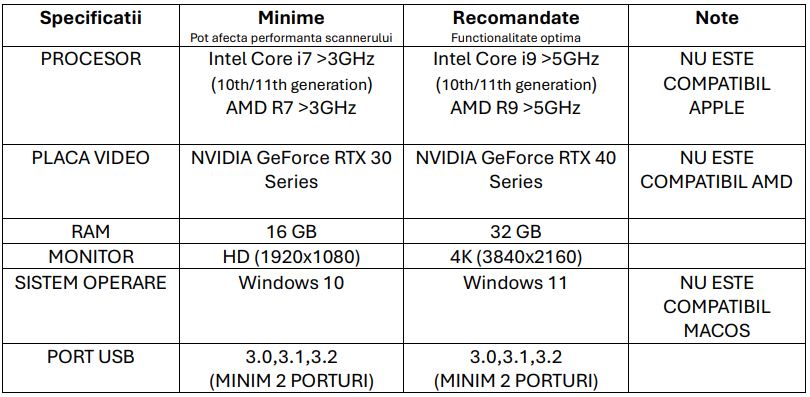
1.Compatibility: Check if the laptop meets the hardware requirements for the scanner operation displayed below in the description
2.Initial checks: Ensure all cables are correctly connected and the device is properly powered. For maximum performance, the laptop should be powered by electricity, not on battery.
3.System settings: Confirm that Windows is with an original license and has all updates up to date, especially the drivers.
4. ATTENTION! Graphics card drivers: Download the latest version of drivers for the video card from the official page https://www.nvidia.com/en-gb/geforce/drivers/
5.Installation instructions: Carefully follow the manuals or installation guides below. The scanner software must be installed on the C: partition, the same one where Windows is installed. We recommend Windows 11.
6.Additional support: If all the above instructions have been followed and the problem persists, contact our support team for specialized assistance.
By following these guidelines, your installation and usage experience will be easier and without complications.
Ghid Trimitere Echipament pentru Garanție și Service
Secțiunea 1: Trimiterea Echipamentului în Garanție
1. Expedierea prin curier
Trimiteți produsul defect împreună cu o descriere detaliată a problemei la adresa: DENTAL EQUIPMENT STORE S.R.L., Str. Dafinului, Nr. 5, Timișoara, în atenția Departamentului Garanție/Service.
Contactați DENTEQUIP la +40 722 884 606 / +40 770 713 820 pentru preluarea coletului. Transportul este suportat de DENTEQUIP dacă produsul este în garanție.
Recomandăm asigurarea coletului și ambalarea corespunzătoare pentru a preveni deteriorarea.
2. Predare personală
Produsul poate fi adus direct la Departamentul Service/Garanții, luni-vineri, între 9:30–16:30.
CUMPĂRĂTORUL POATE SOLICITA RETURUL PRODUSELOR ACHIZIŢIONATE DIN MAGAZINUL ONLINE DENTEQUIP.RO ÎN URMATOARELE SITUAŢII:
Produsele sunt neconforme cu specificațiile de pe site. În situatia în care cumpărătorul, la momentul primirii coletului, apreciază că produsul primit nu respectă specificațiile de pe site, contactează Vânzătorul în vederea clarificării aspectelor sesizate, întrucât, în conformitate cu Termenii și Condițiile site-ului, descrierea produselor poate fi incompletă din motive legate de spațiu și/sau structura informației. În cazul în care se constată o vadita neconformitate cu specificațiile prevăzute pe site, Cumparatorul este obligat să semnaleze neconformitatea în termen de maxim 24 de ore, acesta putând opta pentru înlocuirea cu un alt produs sau pentru rambursarea integrala a sumei achitate.
Produsele s-au livrat eronat de catre Vânzător. În cazul livrării unui alt produs sau în altă cantitate, trebuie sa semnalați incidentul Vânzătorului în maxim 24 de ore pentru a rezolva incidentul. Daca produsul nu mai este pe stoc, Cumparatorul poate opta pentru înlocuirea cu alt produs sau pentru rambursarea integrală a contravalorii.
Produsele se dovedesc nefuncționale în primele 48 de ore de la recepția lor (două zile lucrătoare).Cumpărătorul poate reclama acest lucru în termen de maxim 48 de ore de la data recepției și poate solicita returnarea produsului în vederea înlocuirii cu un produs nou. Dacă produsul nu mai este pe stoc, Cumpărătorul poate opta pentru înlocuirea cu alt produs sau pentru rambursarea integrală a contravalorii.
Conform legislației în vigoare, consumatorul poate renunța la comandă în decurs de 14 zile calendaristice de la primirea coletului. Renunțarea la cumparare este aplicabilă doar clienților persoane fizice!
Solicitantul are dreptul să notifice în scris comerciantului că renunță la cumpărare fără invocarea unui motiv, în termen de 14 de zile calendaristice de la primirea produsului
Returul unui produs de catre persoane juridice se poate face doar cu acordul expres al Vanzatorului!
Nu se acceptă returul produselor consumabile desigilate.
Indiferent de situație, procedura de returnare a produselor presupune înștiințarea Vânzătorului înaintea trimiterii produsului, printr-un mesaj care să descrie cauza returului, trimis la adresa de e-mail contact@dharmadisedigital.com
La trimiterea coletului, Cumpărătorul poate utiliza următorul model de etichetă retur : Formular model.
Produsele trebuie returnate în starea în care au fost primite, însoțite de toate accesoriile și documentele primite la livrarea produselor. Returul va fi refuzat în cazul deteriorării produselor sau a constatării de către Vânzător a stării de nevandabilitate a acestora. Produsele se vor returna prin intermediul serviciului de curierat agreat de Vânzător, pe adresa punctului de lucru din Timisoara, Str.Dafinului nr.5.
Cumparatorul poate opta pentru rambursarea integrala a contravalorii sau pentru înlocuirea cu un alt produs.
Dacă se agreează înlocuirea cu un produs mai scump, Cumpărătorul va achita diferența de preț, respectiv dacă valoarea produsului înlocuitor va fi mai mică, va primi rambursarea parțială corespunzătoare.
Toate costurile de retur și transport vor fi suportate de Cumparator.
Rambursarea banilor se va face prin transfer bancar în contul bancar solicitat de cumparator, în termen de maxim 14 zile de la data primirii produselor.
Pentru comenzile achitate cu cardul, restituirea banilor se va efectua prin intermediul aceluiași canal și în contul de pe care a fost recepționată plata.
De retinut:
• produsul returnat trebuie să fie în aceeași stare în care a fost livrat, în ambalajul original cu toate accesoriile, cu etichetele intacte și documentele care l-au însoțit • cheltuielile de returnare vor fi suportate de client, conform art.14 din OUG 34/2014, iar rambursarea contravalorii produsului se va face în cel mult 14 de zile calendaristice • dacă produsul este returnat într-o stare în care nu mai poate fi vândut ca nou, legea dă dreptul de a solicita o taxă pentru readucerea în stadiul inițial (dacă este posibil) sau pentru a acoperi diferența de preț rezultată din vânzarea produsului ca second-hand sau la opțiunea clientului, îi vom reexpedia produsul, pe cheltuiala acestuia. Acestă clauză se aplică conf. OUG nr. 34/2014, în cazul achiziționării de produse online folosind tehnicile de comunicare la distanță, aplicându-se definițiile cuprinse în articolul 14
În cazul defectelor (defecte de fabricație ascunse, deteriorări la transport, funcționalități defectuoase, componente lipsă) costul total al transportului va fi suportat de către Dental Equipment Store SRL
În conformitate cu noile reglementări ANMDM cumpărătorul este obligat să pună la dispoziția organelor de control ale ANMDM Certificatele CE, declarația de conformitate al fiecărui dispozitiv medical în parte împreună cu avizul vânzătorului de unde a achiziționat produsul. Descarcă documentația aici: https://dharmadisedigital.com/documentatie/
Cele mai căutate produse de către medicii dentiști din toată țara.
Testate, recomandate și mereu în stoc – vezi ce folosesc colegii tăi zi de zi în cabinet.